Product Designer & Full Stack Developer
Sample Follow-up — MYOB Email Automation
A production workflow for an Australian dental supplies business that finds samples on MYOB invoices, schedules personalised follow-ups and stops campaigns when customer replies arrive.
Impact: Replaces spreadsheet chasing with a monitored follow-up process while preserving human control for missing contacts, amended invoices and ambiguous replies.
JavaScript · PHP · MySQL · MYOB AccountRight · Email Automation · IMAP · SMTP · Cron Jobs
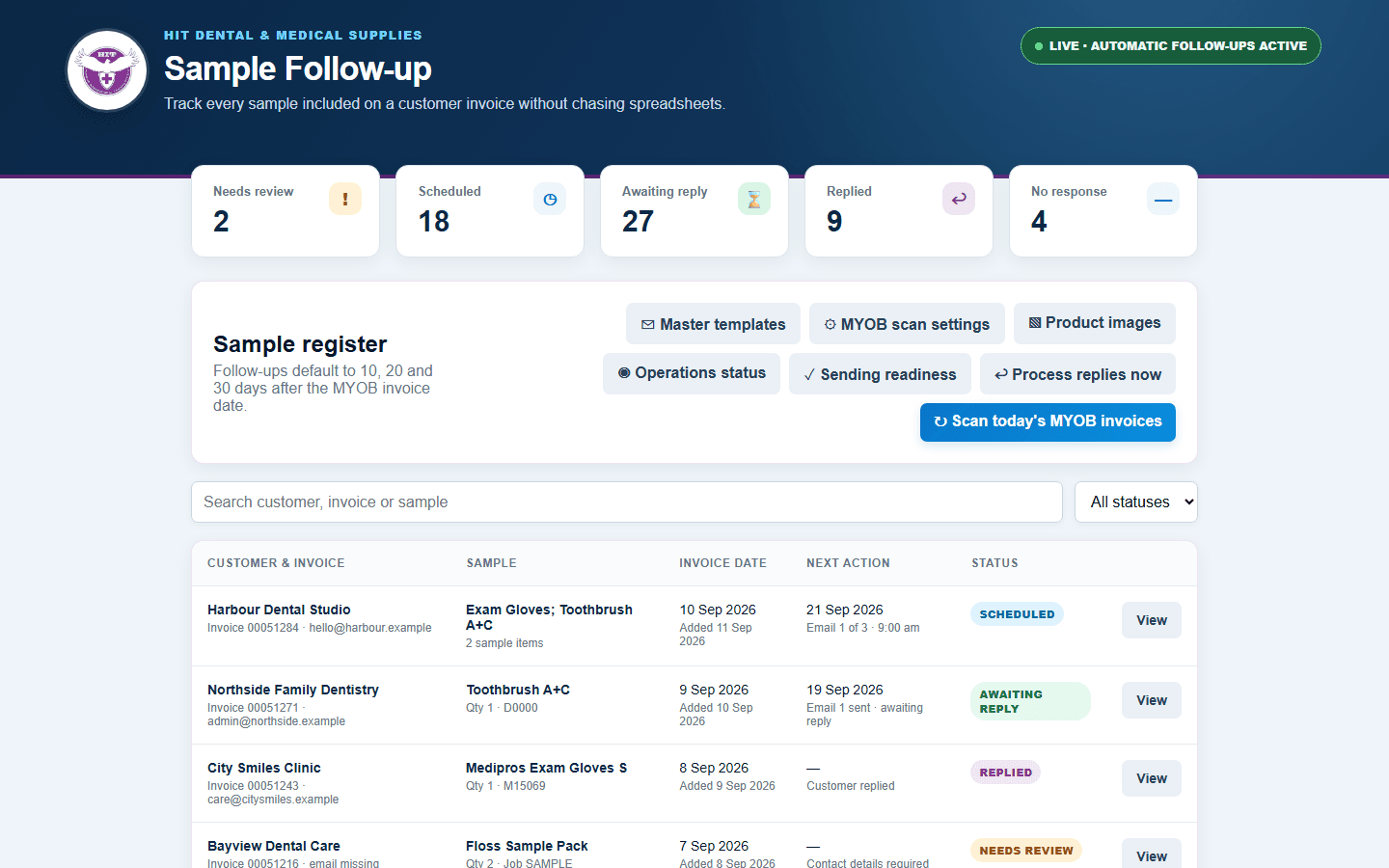
Campaign register · Select a thumbnail to explore the interface
Overview
This is a production internal application I designed and built for HIT Dental & Medical Supplies in Melbourne. When the business includes a sample with a customer order, the system identifies it from MYOB, creates a campaign and manages a three-email follow-up sequence without relying on a separate spreadsheet.
The workflow runs automatically, but it is not a blind email blast. It verifies source invoices, prevents duplicate sends, records customer replies and routes unusual cases to a person. The screenshots in this case study use synthetic customers, invoice numbers, email addresses and message content.
The operational problem
Samples are an important part of the sales process, but follow-up was easy to miss. Staff needed to remember which order contained a sample, calculate when to contact the customer, find the correct recipient and stop chasing once a response arrived. Samples could also appear as a dedicated sample item or as a normal product supplied at no charge.
A useful solution therefore had to work with existing MYOB habits rather than require staff to maintain another system. It also needed to handle practical exceptions: multiple samples on one invoice, cash-sale contact details, changed invoices, automatic replies, delivery failures and customers who should never be contacted again.
Finding samples in the existing workflow
The application scans MYOB AccountRight invoices and recognises samples through three controlled markers: the dedicated D0000 item, a line assigned to the SAMPLE job, or an exact [SAMPLE] marker in the description. A positive shipped quantity is required.
This supports both generic sample lines and real catalogue products used as samples. Multiple matching lines remain separate sample items in one campaign, retaining the product name, item number and quantity. Product images can be mapped by MYOB item number and embedded in the email when available; a single text-only sample is presented without an empty image frame.
Scheduling that respects history
New campaigns follow a configurable sequence, normally 10, 20 and 30 days after the MYOB invoice date. Due messages are aligned to 9:00 am Melbourne time because the team expects morning emails to receive more attention. If a scheduled time has already passed, the message moves to the next morning rather than sending unexpectedly during the day.
The initial production import required special care. Old invoices could represent customers who had already provided feedback outside the new system, so the scan start date was agreed with management instead of importing the entire account history. The scanner is idempotent: repeated daily runs update existing records rather than recreating campaigns.
Replies and exceptions
The reply processor uses the sent-message history, subject, sender and invoice references to associate incoming mail with a campaign. A confirmed customer reply stops the remaining sequence and appears in the conversation history.
Not every inbound message means the same thing. Automatic responses, delivery failures and contact-change notices are recorded for review instead of being treated as useful feedback. Staff can apply a suggested or manually entered address and deliberately restart Email 1. Messages that cannot be matched to exactly one campaign enter an unmatched-email queue for manual linking.
Human control around automation
- Missing or ambiguous email details are held for review rather than guessed.
- Cash-sale delivery details can supply a contact, with a persistent manual override when needed.
- MYOB is checked again immediately before a due email is sent, so amended or cancelled invoices can stop the campaign.
- Unsubscribe records a customer's communication preference; Do not follow up excludes a particular operational record.
- Sending-readiness checks explain why every campaign is ready, blocked or waiting.
- Test and live-send locks keep dry runs separate from customer delivery.
Operations, not just a dashboard
The main register separates records that need attention, are scheduled, are awaiting a reply, have replied or completed without a response. Search, filters, newest-first ordering and server-side pagination keep the register usable as it grows.
An operations view exposes the last MYOB scan, last follow-up job, emails sent, replies received, open failures and the next scheduled sends. This gives the team a way to confirm that unattended Cron jobs are working without reading server logs.
Technical delivery
- Responsive HTML, CSS and JavaScript interface optimised for an internal desktop workflow.
- PHP service layer with MySQL campaign, message, reply, template and audit records.
- MYOB AccountRight API integration for invoice lines, customer details and amendment checks.
- SMTP delivery and IMAP processing for sent-mail reconciliation, customer replies and delivery notifications.
- Server Cron jobs for incremental MYOB scanning, scheduled sends and reply processing.
- Product-image management and email markup tested for Outlook-compatible presentation.
- Idempotency, run locks and message-level deduplication around unattended jobs.
Validation and iteration
I developed the product alongside the staff member who owns the follow-up process and tested it with controlled invoices before live customer sending was enabled. Those tests uncovered requirements that were not visible in the initial brief: normal catalogue items used as samples, multiple sample lines, delivery-detail emails, changed contact addresses, delayed historical campaigns and ambiguous automated replies.
The final workflow reflects those discoveries. Automation handles the repeatable path, while the interface makes exceptions visible and recoverable. That balance was more important than maximising the number of emails sent.
AI-assisted development
AI tools helped accelerate implementation, edge-case exploration, diagnostic endpoints and interface iteration. I remained responsible for stakeholder decisions, MYOB and email-system integration, data modelling, production safeguards, testing and deployment.